Control lines Tab
Control lines tab allows you to define the "operating mode" for CTS, DSR, and DCD "inputs" of the VSP . CTS, DSR, and DCD are actually real physical input lines found on serial ports/cables (they exist alongside RTS and DTR outputs). It is a standard COM port functionality to be able to report the status of CTS, DSR, and DCD inputs to the application software that is working with this COM port.
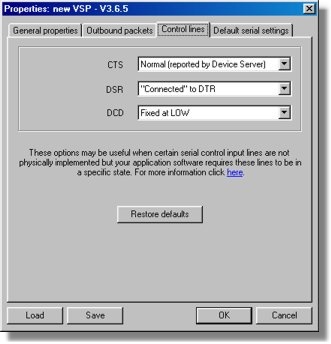
The following options are available for each input line:
| • | Normal (reported by Device Server). In this mode the application software working with the VSP is updated (or queries) the status of actual physical lines on the serial port of the DS*. |
| • | Fixed at HIGH. When this option is selected for a particular line this line appears to always be at HIGH ("enabled"), no matter what actual state of the corresponding physical line on the Device Server's serial port is. |
| • | Fixed at LOW. When this option is selected for a particular line this line appears to always be at LOW ("disabled"), no matter what actual state of the corresponding physical line on the Device Server's serial port is. |
| • | Connected to RTS (DTR). When this option is selected for CTS input it appears to be connected to the RTS output. When this option is selected for DSR input it appears to be connected to the DTR output. To the application software, this really looks like there is a wire interconnecting CTS and RTS (or DTR and DSR) lines. DCD line doesn't have a "pair" so this option is not available for DCD. |
Fixed at HIGH , fixed at LOW , and connected to RTS (DTR) options are handy when certain serial control input lines are not physically implemented but the application software requires these lines to be in a specific state. For example, DTR and DSR lines are not implemented on the DS100R Device Server, yet some application software might wait for the DSR input to become HIGH as an indication that the serial device is ready to accept the data. To make sure that the software receives the state it is looking for the DSR line can be set to fixed at HIGH .
* This functionality depends on so-called notifications that are automatically generated by the DS and sent to the VSP and also on-the-fly commands (network-side parameters) generated by the VSP.